
Runnable public example

Test a programmable school-fees USSD journey.

See how a student reference, account result and payment path can fit into short USSD screens. The public example is a safe simulation: it uses no real school record and moves no money.

The complete example

Five connected jobs, not five unrelated screens.

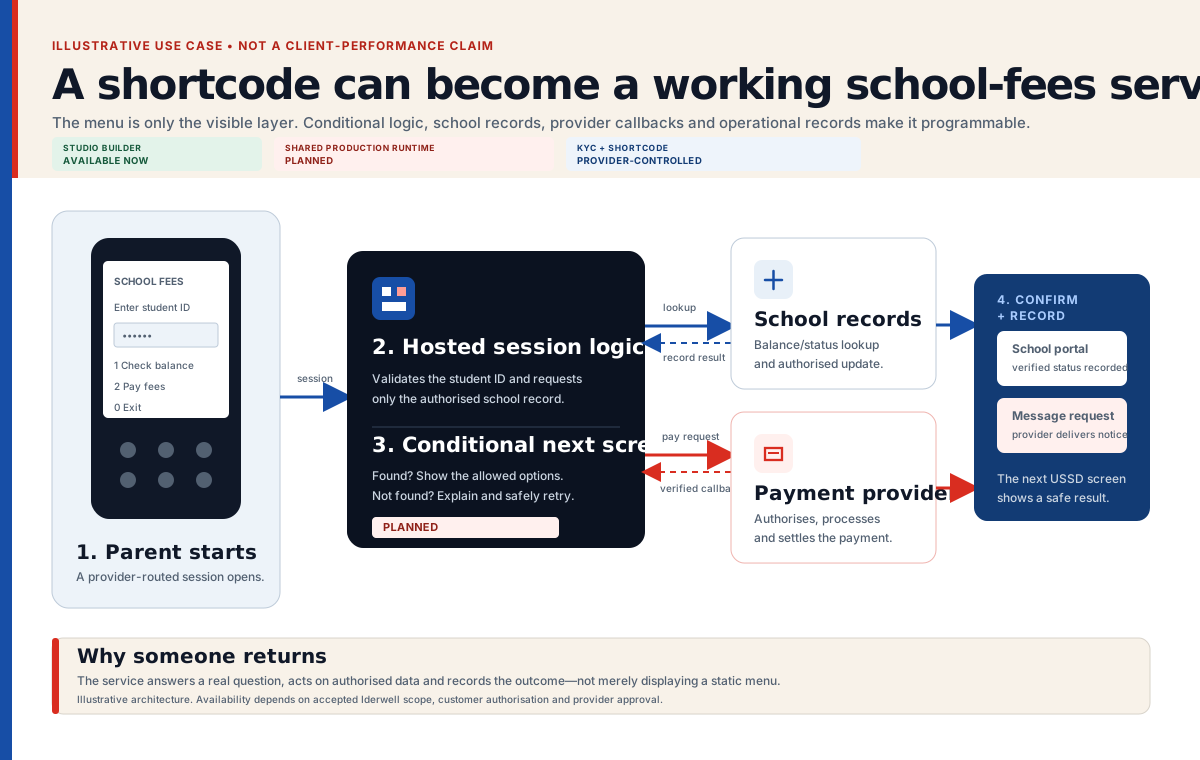
The browser demo lets you understand the sequence before any database, payment provider or live shortcode is involved.

School fees USSD sequence: identify student, find record, choose action, wait for provider confirmation, record and confirm
Illustrative workflow. The public example uses invented demonstration records and simulated provider steps.
  1. 01

    Identify the student

    The caller enters a student reference in the USSD session.

  2. 02

    Find the relevant record

    A live implementation checks the supported school record and returns the useful account information.

  3. 03

    Choose what to do

    The caller can review the result and follow an approved payment or support path.

  4. 04

    Wait for provider confirmation

    A payment request is not treated as paid until the payment provider reports a verified result.

  5. 05

    Record and confirm

    The software updates the correct account and may ask an approved SMS provider to send a receipt or status message.

Available in the browser example

Learn and test now.

  • Open the complete example without creating an account
  • Try every supported route in the phone simulator
  • See how input, choices and simulated payment fit together
  • Create a free workspace when you want to adapt the idea

Required for a real school service

Connect only after review.

  • An approved school use case and operating owner
  • A safe, supported source for student and fee records
  • The organisation’s approved provider relationship
  • A production-ready hosted application and payment-confirmation rule after all required gates pass
  • A staff process for unmatched or disputed records

Payment boundary

The last USSD screen does not prove payment.

A live system should update the student account only after the approved payment provider returns a verified result. Delayed, repeated and unmatched results need a clear staff-review process.

Read the payment-confirmation guide →

Take the next useful step

Run it, understand it, then change it.

The examples are learning shortcuts, not product limits. A verified Studio account can create and save a different supported flow from scratch.